# Subnetting
Subnetting is the organization of hosts within smaller networks using subnet masks, which allows us to route packets to their destination more efficiently. This approach is similiar to what is employed by delivery services, where the package is first routed to a sorting destination within a certain range of the final destination. By routing packets through the nearest subnet we reduce the overhead of traveling long distances and instead we make smaller hops between organized subnets.
For a single IP address there are 32 bits. This means that the IP `0.0.0.0` is equal to `00000000.00000000.00000000.00000000` in bits. This is an important concept to keep in mind, as it will help to understand subnet masks later on. When converting these to decimal IP addresses, we should keep in mind that each octet (set of 8 bits) starts at 27 and ends at 20. So, the IP `11000000.00110000.00001111.00111100` is calculated as follows, where each step is a single octet converted to decimal form.
1. `11000000` = 1x27 + 1x26 + 0x25 + 0x24 + 0x23 + 0x22 + 0x21 + 0x20 = 192
2. `00110000` = 0x27 + 0x26 + 1x25 + 1x24 + 0x23 + 0x22 + 0x21 + 0x20 = 48
3. `00001111` = 0x27 + 0x26 + 0x25 + 0x24 + 1x23 + 1x22 + 1x21 + 1x20 = 15
4. `00111100` = 0x27 + 0x26 + 1x25 + 1x24 + 1x23 + 1x22 + 0x21 + 0x20 = 60
So the IP `11000000.00110000.00001111.00111100` represented in bits is equal to 192.48.15.60, which is a class C IP address.
There are 5 classes of IP addresses, which are outlined below.
Class A - From left-to-right, everything before the first `.` identifies the network, and all other sections of the IP represent different devices on that network. For example, `127.56.98.102` is on the `127` network, and the device is `56.98.102`. In bits, a class A IP must begin with a single `0`, leaving 7 more bits available to identify the network, and the remaining 24 bits to identify devices within the network. So, with a class A IP we have 27 (128) possible network ranges, where each range has 224 (16,777,216) IPs available to assign to devices. Thus, class A IPs start at `0.0.0.0` and end at `127.255.255.255`. Class A IPs are used for very large networks, notably those deployed by Internet Service Providers (ISPs). This is where your public IP adddress lives.
Class B - From left-to-right, everything before the second `.` identifies the network, and all other sections of the IP represent different devices on that network. For example, `128.123.58.19` is on the `128.123` network, and the device is `58.19`. In bits, a class B IP must begin with `10`, leaving 14 more bits available to identify the network, and the remaining 16 bits to identify devices within the network. So, with a class B IP we have 214 (16,384) possible network ranges, where each range has 216 (65,636) IPs available to assign to devices. Thus, class B IPs start at `128.0.0.0` and end at `191.255.255.255`. These IPs are often used for large networks deployed by enterprises or organizations with large infrastructure. This is where a company like Google or Amazon would organize their infrastructure.
Class C - From left-to-right, everything before the third `.` identifies the network, and all other sections of the IP represent different devices on that network. For example, `192.48.15.60` is on the `192.48.15` network, and the device is `60`. In bits, a class C IP must begin with `110`, leaving 21 more bits available to identify the network, and the remaining 8 bits to identify devices within the network. So, with a class C IP we have 221 (2,097,152) possible network ranges, where each range has 28 (256) IPs available to assign to devices. Thus, class C IPs start at `192.0.0.0` and end at `223.255.255.255`. These IPs are often used for small business and home networks, and is where your local IP address lives.
Class D - Class D IPs use all 32 bits for network addressing but they must begin with `1110`, leaving 28 more bits available to identify the multicast IP. For example, `227.63.12.126` is just the `227.63.12.126` multicast IP address with no further identification for a host device. Thus, class D IPs start at `224.0.0.0` and end at `239.255.255.255`. These addresses are used for multicasting operations and there are no host devices within this IP class. So, with a class D IP we have 228 (268,435,456) possible multicast IPs.
Class E - Class E IPs use all 32 bits for network addressing but they must begin with `1111`, leaving 28 more bits available to identify the IP. So, with a class E IP we have 228 (268,435,456) possible IPs. Thus, class E IPs start at `240.0.0.0` and end at `255.255.255.255`. But these addresses are not used at all and considered invalid, thus there are no host devices or networks within this IP class. The only exception is the broadcast IP address which is the same on every network - `255.255.255.255`
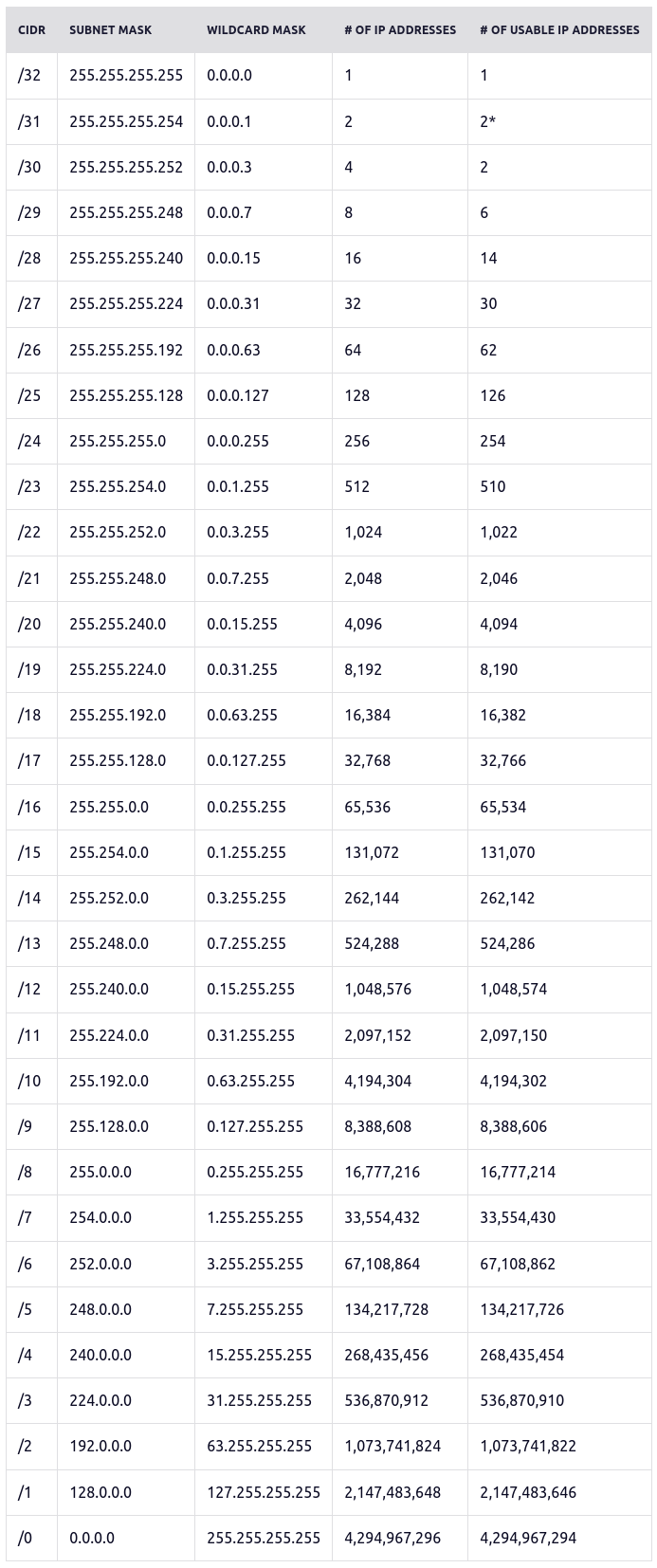
IP prefixes represent a count of bits used to identify a network, which helps to define the subnet of available hosts. For example, `x.x.x.x/4` uses 4 leading bits to identify the network which can host 232 - 4 IP addresses (268,435,456)
All IP subnets possible can be seen in this table, provided at
[Freecodecamp - Subnet Cheatsheet](https://www.freecodecamp.org/news/subnet-cheat-sheet-24-subnet-mask-30-26-27-29-and-other-ip-address-cidr-network-references/)
[](https://knoats.com/uploads/images/gallery/2022-03/image-1648213525738.png)
[PCMag - IP Addresses](https://www.pcmag.com/news/the-abcs-of-ip-addresses)
[paessler - IP Addresses](https://www.paessler.com/it-explained/ip-address)
[Cloudflare - Subnetting](https://www.cloudflare.com/learning/network-layer/what-is-a-subnet/)
[Pearson - Subnetting](https://www.pearsonitcertification.com/articles/article.aspx?p=1843891)